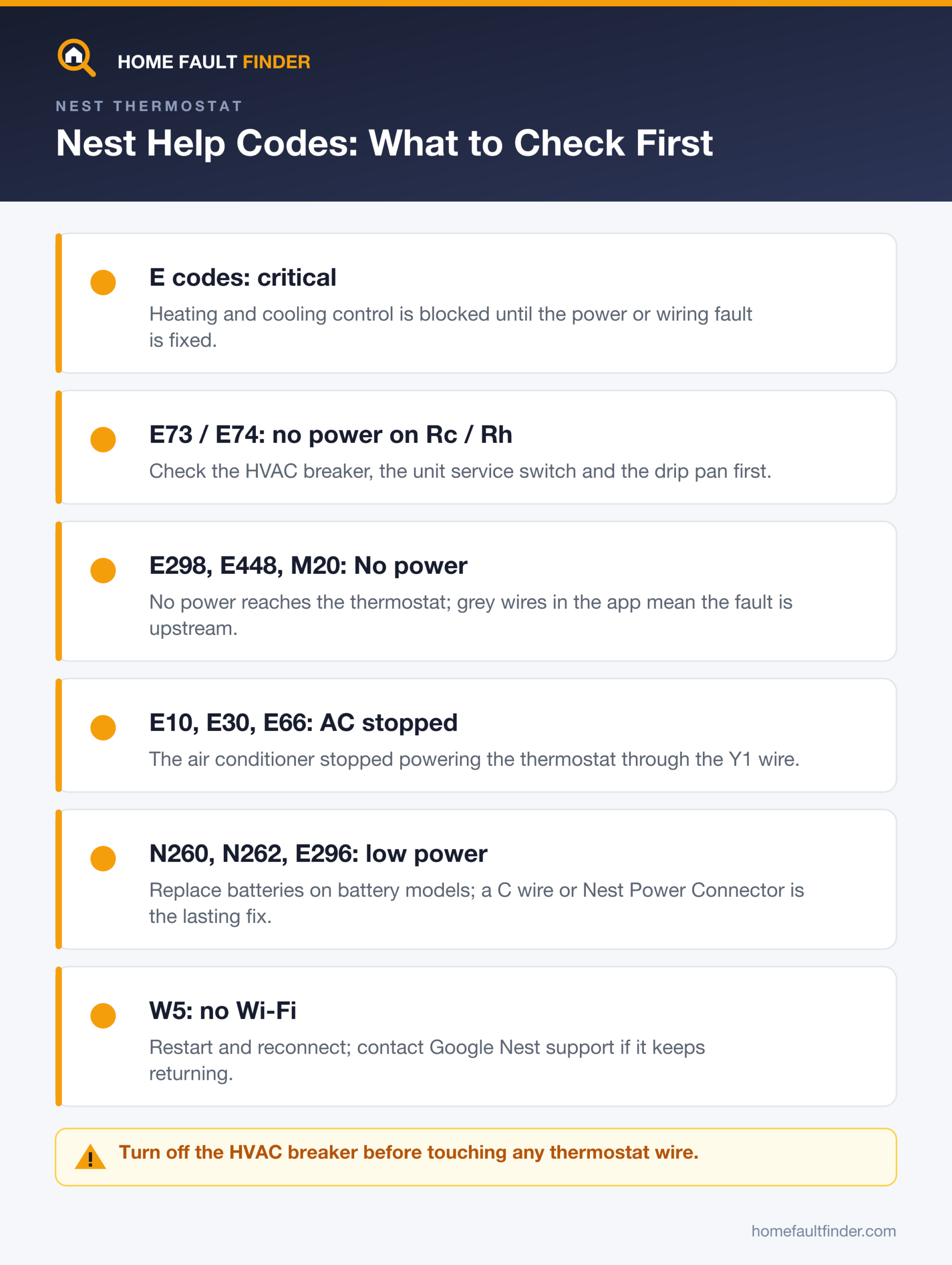
Nest thermostat error codes are help codes that start with a letter: E codes are critical and block heating or cooling until fixed, N codes flag wiring or low power, and W codes mean Wi-Fi trouble. The most searched, E73 and E74, mean no power on the Rc or Rh wire, which usually points to the HVAC system.
- E73 means no power to the Rc wire and E74 no power to the Rh wire; older units show E3/E23 or E4/E24, and E195 covers a single R wire.
- E298, E448 and M20 are the “No power” alert: no power is reaching the thermostat from the HVAC system.
- E10, E30, E66 and M13 usually mean the air conditioner stopped powering the thermostat through the Y1 wire.
- W5 means no Wi-Fi connection; restart first, and contact Google if it persists.
This guide covers the Google Nest Learning Thermostat (1st to 4th generation), the Nest Thermostat E and the Nest Thermostat (2020). The same fault can carry a different number on each generation, so we only list codes that Google’s support pages define and independent sources describe the same way. For anything not listed, check the Nest app or Google’s help-code page for your model before touching wiring.
What do Nest thermostat error codes mean?
Nest thermostat error codes, which Google calls help codes, pair a letter with a number to identify a fault. The letter gives the category: E codes are critical and stop heating or cooling, N codes cover power and wiring, W codes cover Wi-Fi, and T codes appear during the System Test after installation. A W code is never fixed by touching wires.
| Letter | Category (per Google) | Where to start |
|---|---|---|
| E | Critical wiring or power problem; heating/cooling control blocked | HVAC power, then wiring |
| N | Power and wiring warnings, such as low power to a wire | Wire connections, power source |
| W | Wi-Fi connection failures | Router and thermostat restart |
| T | System Test results after installation | Re-run the test, check wiring |
| TD / TH | App setup, connectivity, Thread network | Phone, router, app setup |
| M | Miscellaneous, such as batteries or maintenance | Message text in the app |
What do E73 and E74 mean on a Nest thermostat?
E73 and E74 are Nest power codes: E73 reads “No power to Rc wire detected” and E74 reads “No power to Rh wire detected.” Other generations show the same faults as E3 and E23 (Rc) or E4 and E24 (Rh), and E195 means no power on a single R wire. The wire is present but carries no 24-volt power.
Google notes that in hot summer months an HVAC system can break down and stop powering the thermostat, and that a summer E73 or E74 will likely need an HVAC professional. Common causes, easiest first:
| Likely cause | What you can check | Who fixes it |
|---|---|---|
| HVAC breaker tripped or unit switch off | Furnace/air handler breaker; service switch near the unit | You (reset once) |
| Loose R wire at the thermostat base | With the breaker off, check the wire is fully seated | You |
| Clogged condensate drain tripped the float switch | Water in the drip pan near the indoor unit | You or a pro; never bypass the switch |
| Blown low-voltage fuse on the control board | Not DIY: inside the equipment cabinet | HVAC pro |
| Failed transformer, board or damaged wire | None safely | HVAC pro |
A clogged drip pan or drain tube can make the AC or heat pump shut off to prevent an overflow, which also cuts thermostat power. Our guide to an air conditioner leaking water inside covers drain clogs.
Why does my Nest say “No power” (E298, E448, M20)?
A Nest “No power” or “No system power” alert means the thermostat is getting no power from the heating and cooling system. Google ties the alert to help codes E298, E448 and M20. The thermostat may also drop off Wi-Fi while running on its internal battery, even when the battery level looks fine.
Google lists two root causes. Either the wiring is wrong or a needed C (common) wire is not connected, since heat-only, cool-only, zone-controlled and heat pump systems usually need a C wire or a Nest Power Connector. Or the HVAC system is off at the breaker, fuse box or system switch. In the app’s wiring info screen, grey wires carry no voltage; if all are grey, the problem is upstream. A dark display is covered in our thermostat screen blank guide.
What do E10, E30, E66 and M13 mean?
E10, E30, E66, E80, E116, E160, E196 and M13 are Nest codes meaning the thermostat lacks power because the air conditioner stopped sending it. Nest thermostats can run without a C wire by drawing power through the Y1 (cooling) wire, so when the AC shuts down, the thermostat loses its power source.
Google gives two reasons: the cooling system broke down or needs maintenance, or very cold weather tripped a low-pressure or safety cutout switch. Its temporary workaround is to switch off HVAC power at the breaker, photograph the wiring, disconnect and tape the Y wires, then restore power so heat can run. AC will not work until Y1 is reconnected, and Google recommends a professional find the root cause. If heat still fails, see our guide to a furnace not turning on.
What do N260, N262 and E296 mean?
N260 is a Nest code that reads “A C wire or Nest Power Connector is recommended for your thermostat.” N262 and E296 are low-power codes Google treats as battery related: the thermostat cannot keep its battery charged from the power it borrows through the heating or cooling wires.
For N262 and E296, Google’s first step is checking and replacing the batteries on battery models. The lasting fix is dedicated power: an unused wire in the cable connected as a C wire, or Google’s Nest Power Connector, which works with the Nest Thermostat, the 3rd- and 4th-generation Learning Thermostat and the Thermostat E. Google warns that some third-party C-wire adapters can damage the thermostat.
The Nest Power Connector mounts at the furnace or air handler, which carries household voltage. Turn off the HVAC breaker first, and hire an HVAC technician if you are not comfortable working at the equipment.
How do I fix a Nest W5 code?
A Nest W5 code means the thermostat cannot connect to Wi-Fi. The code shows only on the thermostat display, not in the app, and heating and cooling still run locally. You lose remote control from the Google Home app and voice assistants until the connection returns.
-
Confirm the code
If you dismissed the message, check the thermostat’s Network menu. Time: 1 minute.
-
Restart the thermostat
Settings, then Reset, then Restart. Your schedule is kept. Time: 2-3 minutes.
-
Reconnect to Wi-Fi
Settings, then Network, and select your network again.
-
Contact Google Nest support
Google says a persistent W5 can indicate a hardware fault. Have the code and the serial number from the back of the display ready.
W1 to W4 point to router settings; our smart thermostat not connecting to Wi-Fi guide covers router-side fixes.
How do you troubleshoot a Nest power code safely?
Troubleshooting a Nest power code such as E73, E74, E195 or E298 follows one safe order: confirm the equipment has power, check wire seating with the breaker off, then look for a tripped safety switch. Google says to turn off power at the breaker or fuse box before exposing or adjusting any wiring, because the HVAC system uses high voltage.
Switch off the furnace or air handler breaker and confirm the thermostat screen goes dark. Do not open the equipment or breaker panel cover. If you smell gas, leave the house and call the gas utility or 911 from outside.
-
Check the breaker and service switch
Reset a tripped furnace or air handler breaker once, and make sure the service switch near the unit is on. Time: 5 minutes.
-
Check the drip pan and filter
Standing water in the pan means a clogged drain has likely tripped a float switch. Replace a dirty air filter.
-
Reseat the wires with power off
Pull the display off its base, photograph the wiring, and push each wire fully into its terminal. Restore power and wait a few minutes.
-
Read the app’s wiring screen
If every wire shows grey, stop and call a pro.
Which Nest codes can you fix yourself?
Nest code fixes split into owner checks and technician jobs. We built the table below from Google’s code definitions: if the first check does not clear the code, the fault almost always sits inside the equipment, where a licensed HVAC technician should take over.
| Code(s) | Your first check | If it persists |
|---|---|---|
| E73 E74 E195 | Breaker, switch, drip pan, wire seating | Pro: fuse, float switch, transformer |
| E298 E448 M20 | Breaker, system switch, app wiring screen | Pro, or C wire / Power Connector |
| E10 E30 E66 | Breaker; Google’s Y-wire workaround | Pro to diagnose the AC |
| N260 N262 E296 | Batteries (battery models) | C wire or Power Connector |
| W5 | Restart and reconnect | Google Nest support |
What will not fix a Nest error code?
Replacing the thermostat rarely fixes E73, E74 or E298, because those codes report missing power from the equipment, and a new thermostat on the same wires shows the same code. Guesswork changes to the wiring can also add new faults on top of the original one. Other common mistakes:
- Factory-resetting for a power code: a reset clears settings, not a tripped float switch or blown fuse.
- Bypassing a float switch or door safety switch to restore cooling.
- Replacing a control-board fuse that keeps blowing: that signals a short a technician must trace.
For other brands, see our Honeywell thermostat error codes guide, and our air conditioner troubleshooting checklist when the code points back to the cooling equipment.
Call a licensed HVAC technician if a power code returns after the breaker and wire checks, the drip pan keeps filling, a fuse has blown, or you need a C wire run. If you have a gas furnace and smell gas, do not touch switches; leave the house and call your gas utility or 911 from outside.
Frequently asked questions
How do I clear an error code on my Nest thermostat?
Most Nest error codes clear on their own once the cause is fixed. E codes cannot be dismissed and stay on screen until the power or wiring problem is resolved. Some N and M messages can be dismissed but return if the issue persists, so a restart alone rarely fixes a power code.
Why does my Nest keep saying no power to the Rh wire?
A repeating no-power-to-Rh message usually means the equipment keeps cutting power. A float switch tripping from a slow condensate clog, an intermittent breaker or a loose wire are typical causes. A code that keeps returning after basic checks needs an HVAC technician to inspect the equipment.
Does a Nest thermostat need a C wire?
A Nest thermostat can often run without a C wire by drawing power through the heating or cooling wires. Google says heat-only, cool-only, zone-controlled and heat pump systems usually need a C wire or a Nest Power Connector, and codes like N260 signal that dedicated power would help.
Will my Nest thermostat still heat with an error code?
Heating depends on the code letter. E codes are critical and block heating and cooling control until fixed. W codes affect only Wi-Fi, so the thermostat keeps running your schedule locally. Many N codes are warnings that limit some functions while the system keeps running.
Can low batteries cause a Nest error code?
Yes. Google lists a change-batteries message (M19) and treats E296 and N262 as low-power codes tied to the battery. On battery models such as the Nest Thermostat (2020), replacing the batteries is the first step; on other models, low power usually points to wiring or a missing C wire.